AI-OS
Meet MakuluLinux AI-OS Desktop: A Familiar Linux Foundation.
Reimagined for the AI Age
Your desktop should do more than give you somewhere to open applications. It should help you understand your computer, shape your workspace around the way you think, and make useful assistance easy to reach.
That is the idea behind MakuluLinux AI-OS Desktop: a modern Linux desktop environment that combines familiar everyday computing with a distinctive visual identity, extensive personalization, and Electra AI integration.
AI-OS is being built for people who want the freedom of Linux without feeling that their desktop has stopped evolving. It brings together practical tools, flexible appearance controls, a redesigned settings experience, a desktop dashboard, and access to AI capabilities for writing, coding, research, image generation and supported desktop tasks.
The ambition is straightforward: make the desktop feel more useful, more personal and more connected to what you are trying to accomplish.
What exactly is AI-OS Desktop?
AI-OS Desktop is a Linux desktop environment, developed by MakuluLinux and used as the desktop experience in its AI-OS editions.
This distinction matters. The underlying Linux distribution supplies the kernel, hardware support, package management and much of the system foundation. AI-OS provides the desktop shell, panels, settings experience, window management, file-management interface and the integration that brings those pieces together.
When you use a MakuluLinux AI-OS installation, you are using that desktop as part of a complete operating-system experience. Development also targets installation on supported Debian and Ubuntu foundations.
AI-OS began as a fork of Cinnamon and its desktop components. That foundation gives it a recognizable, practical starting point: application menus, a panel, system indicators, workspaces, window controls, keyboard shortcuts and a capable file manager.
But the purpose is not simply to recolor Cinnamon. We are developing an AI-OS identity through redesigned interfaces, new desktop tools, more flexible visual controls and deeper connections to Electra.
We want users to feel they are using AI-OS, with familiar elements of Cinnamon, rather than a familiar desktop with an AI shortcut added to it.
Familiar enough to use immediately
A modern interface should not require you to relearn basic computing.
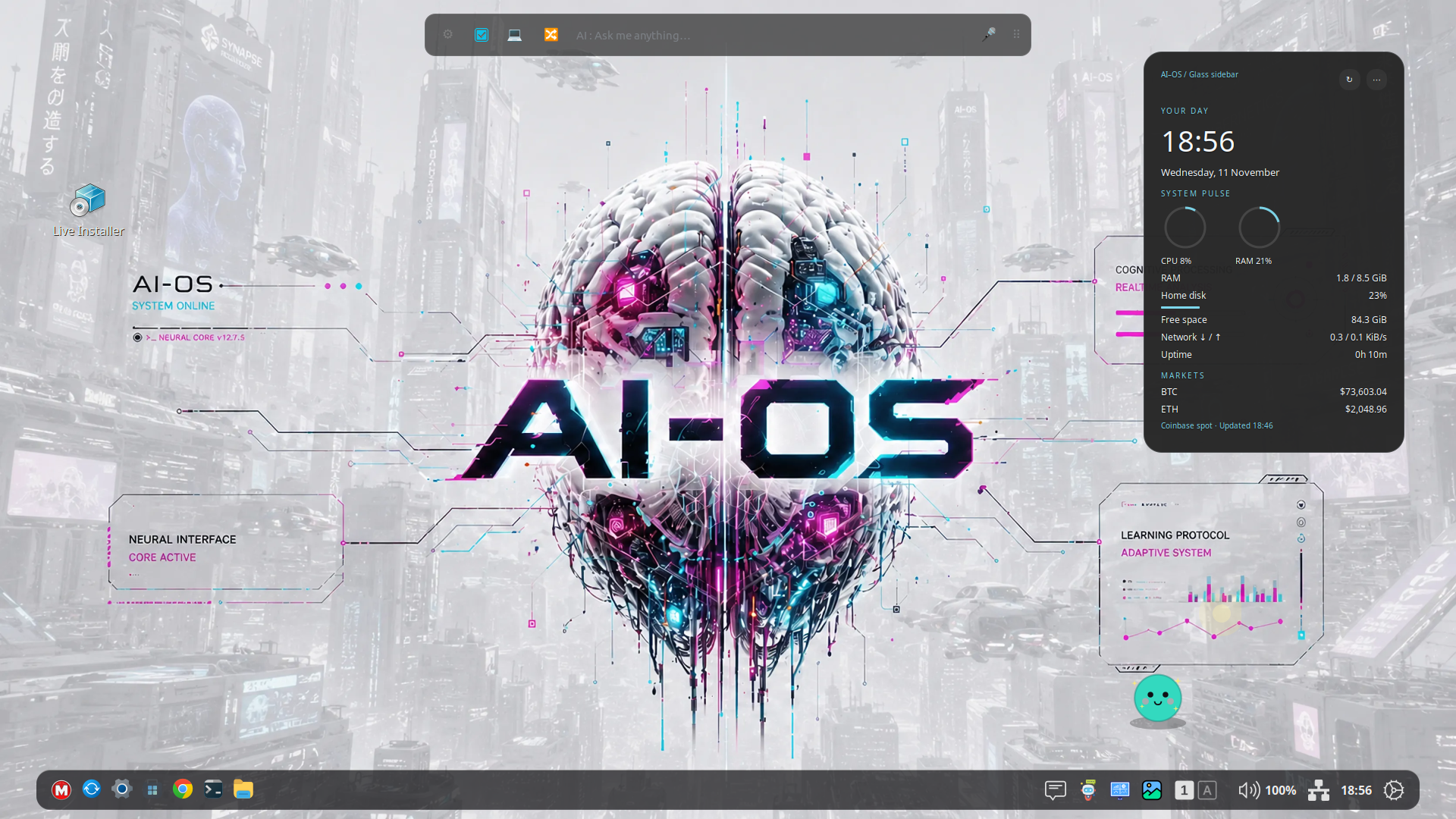
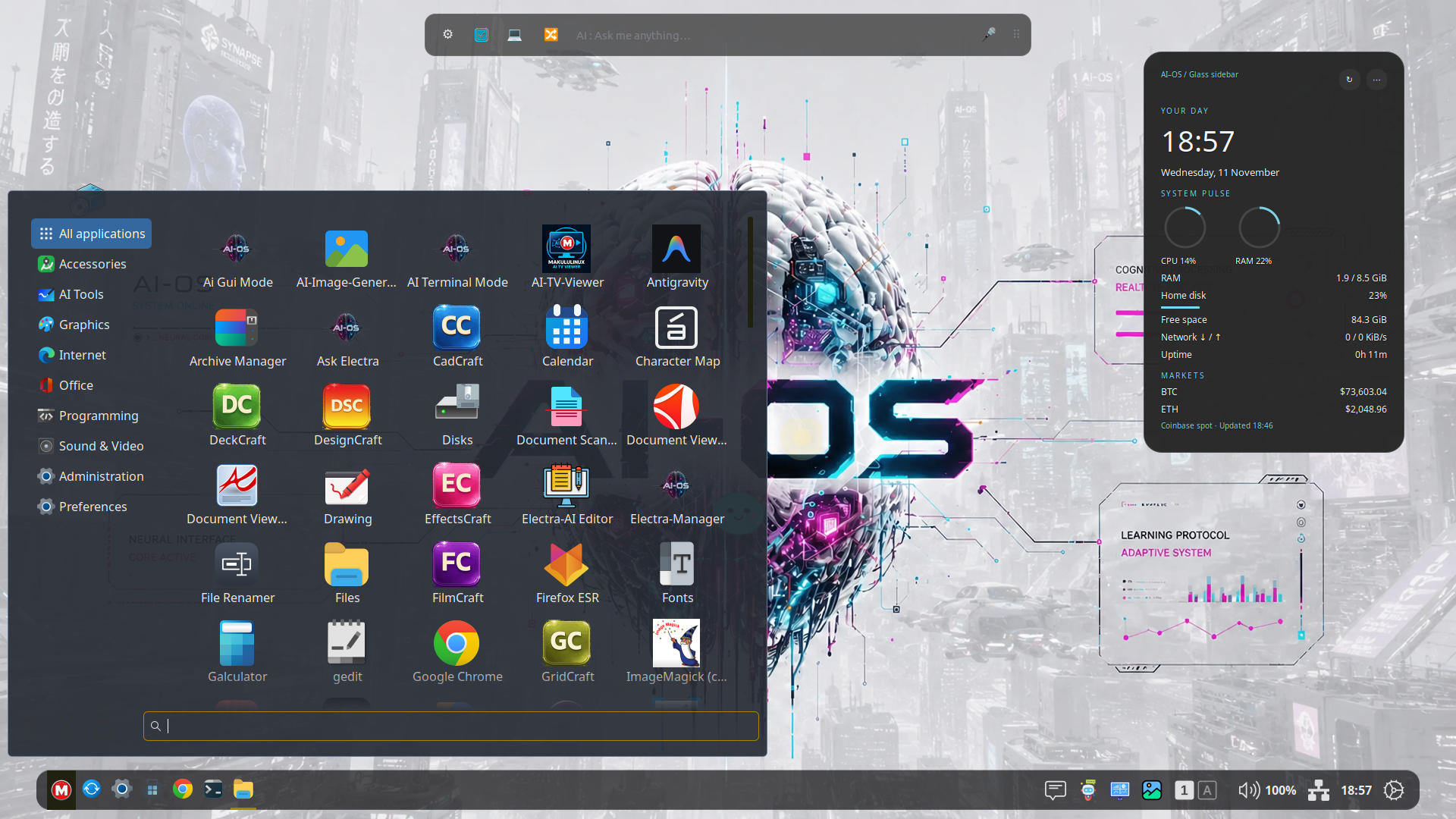
AI-OS retains the workflow people already understand. Open an application from the menu. Pin tools to the panel. Move and resize windows. Switch workspaces. Browse files in tabs. Use keyboard shortcuts. Change your default applications. Keep working with the Linux software you know.
The AI does not replace these ordinary controls. You can still use the desktop directly, and your routine file management and application work do not require you to conduct a conversation with an assistant.
This is an important part of the design: AI should add useful capabilities without making simple actions unnecessarily complicated.
A visual identity you can make your own
One of the strongest differences in AI-OS is the amount of attention given to personalization.
We do not believe users should have to search through dozens of unrelated theme downloads just to get a desktop that feels right. Appearance Studio brings more of that control into the desktop itself.
Depending on the selected appearance and supported application, you can adjust window and control colors, text colors, highlights, borders, transparency, corner styling and shadow depth. These settings let you build anything from a restrained professional workspace to a more expressive, layered desktop.
Charcoal and Frost material styles provide alternatives to a conventional flat interface. You can choose a darker, more focused appearance or a lighter translucent treatment, then adjust colors and opacity to suit your wallpaper and preferences.
The intention is to make windows feel like coherent surfaces, with readable text and controls, rather than an assortment of disconnected colored boxes.
There are practical limits. Applications that draw their own interfaces may retain some of their own styling. GTK, Qt, Electron and browser-based software do not all obey the same appearance rules. Translucency also does not automatically mean true background blur. We are improving consistency across the desktop while being realistic about those differences.
The result is choice: use a more traditional appearance, explore glass-inspired materials, or find a balance that suits your work.
A panel that adapts to your workspace
The panel remains a familiar home for applications, indicators and the clock, but it has gained new presentation options.
Classic, Floating and Compact layouts let you choose between a traditional edge-attached panel and a more contemporary floating surface. Adjustable spacing, width, rounding and appearance controls help it fit the rest of your desktop.
For always-visible floating layouts, the panel can return to a full-width, edge-attached form when a window is maximized, then return to its floating presentation when that window is restored. This helps preserve the visual appeal of a floating panel without making maximized applications feel awkwardly detached from the screen edge.
Popup corners and spacing have also received attention, helping menus and supported applet popups feel more consistent with the panel.
Compatibility with the existing applet ecosystem remains important. We want to extend the desktop’s possibilities while retaining useful ways users already customize their panels.
Quick Settings: everyday controls within reach
A useful desktop puts common adjustments close at hand.
AI-OS Quick Settings brings together convenient access to areas such as network information, sound, display controls, Night Light, AI Settings and session actions. Instead of opening several settings pages for small changes, you can reach everyday controls from the panel.
Audio integration includes support for volume amplification up to 150%, following the Enhanced Audio approach used in the desktop. This can help with quiet recordings and low-output speakers, although higher amplification can introduce distortion depending on the source and hardware.
Logout, restart and shutdown options are available alongside the other quick controls, giving the panel a more complete role in everyday system use.
Settings that feel like part of a modern desktop
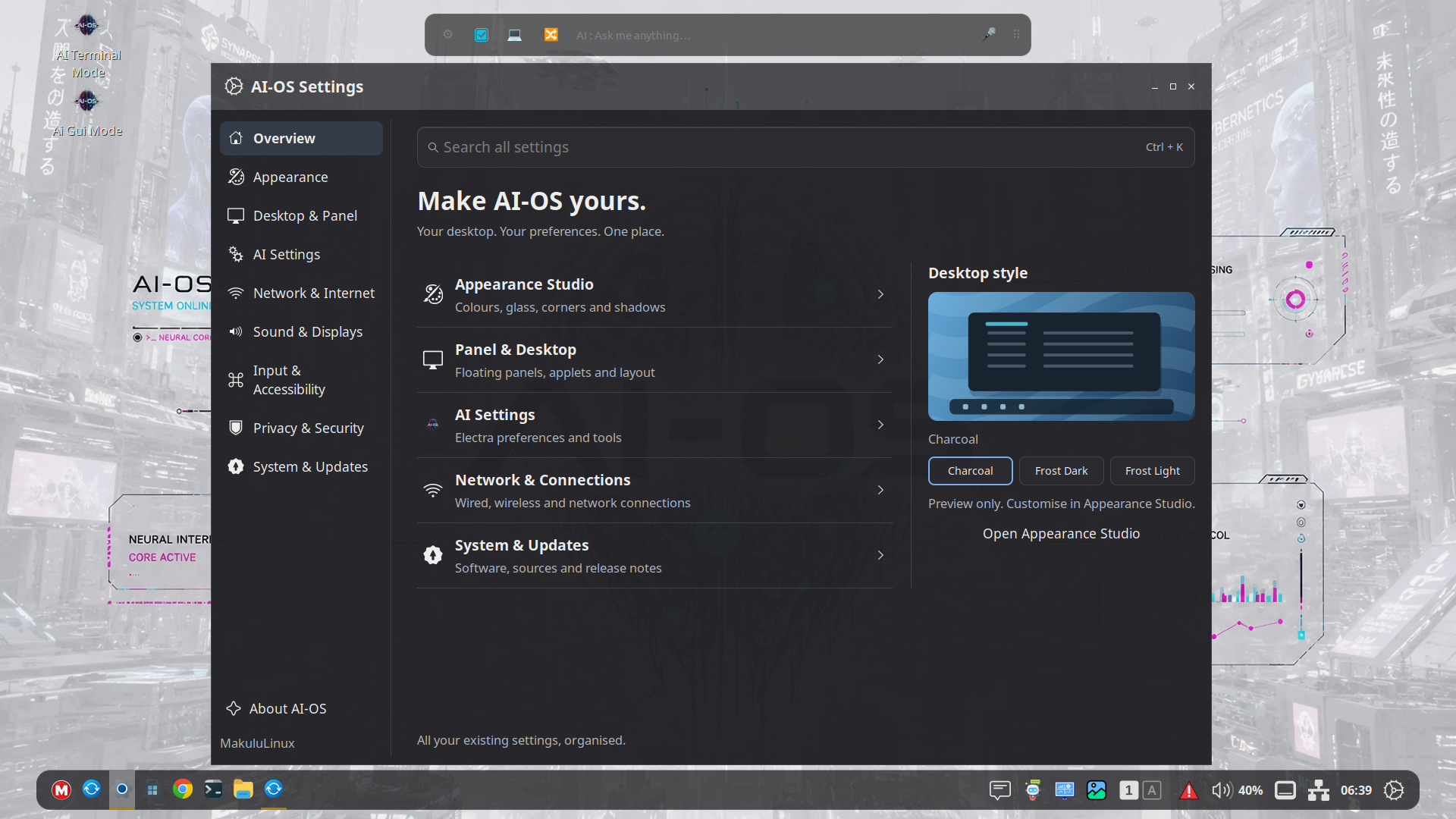
The Settings Center has been redesigned around clearer navigation, a sidebar, a wider search field and a more organized presentation.
Appearance, desktop and panel options, AI settings, networking, sound, displays, input, accessibility, privacy and system tools are easier to approach as parts of one environment.
This is an ongoing redesign. The modern homepage and shared styling provide the foundation, while individual settings pages continue to receive attention. Familiar settings capabilities remain important; modernization should improve access to them rather than remove useful options.
The desktop also includes an About AI-OS page and a release-history interface, helping users understand what they are running and what has changed between builds.
A desktop dashboard that belongs on the desktop
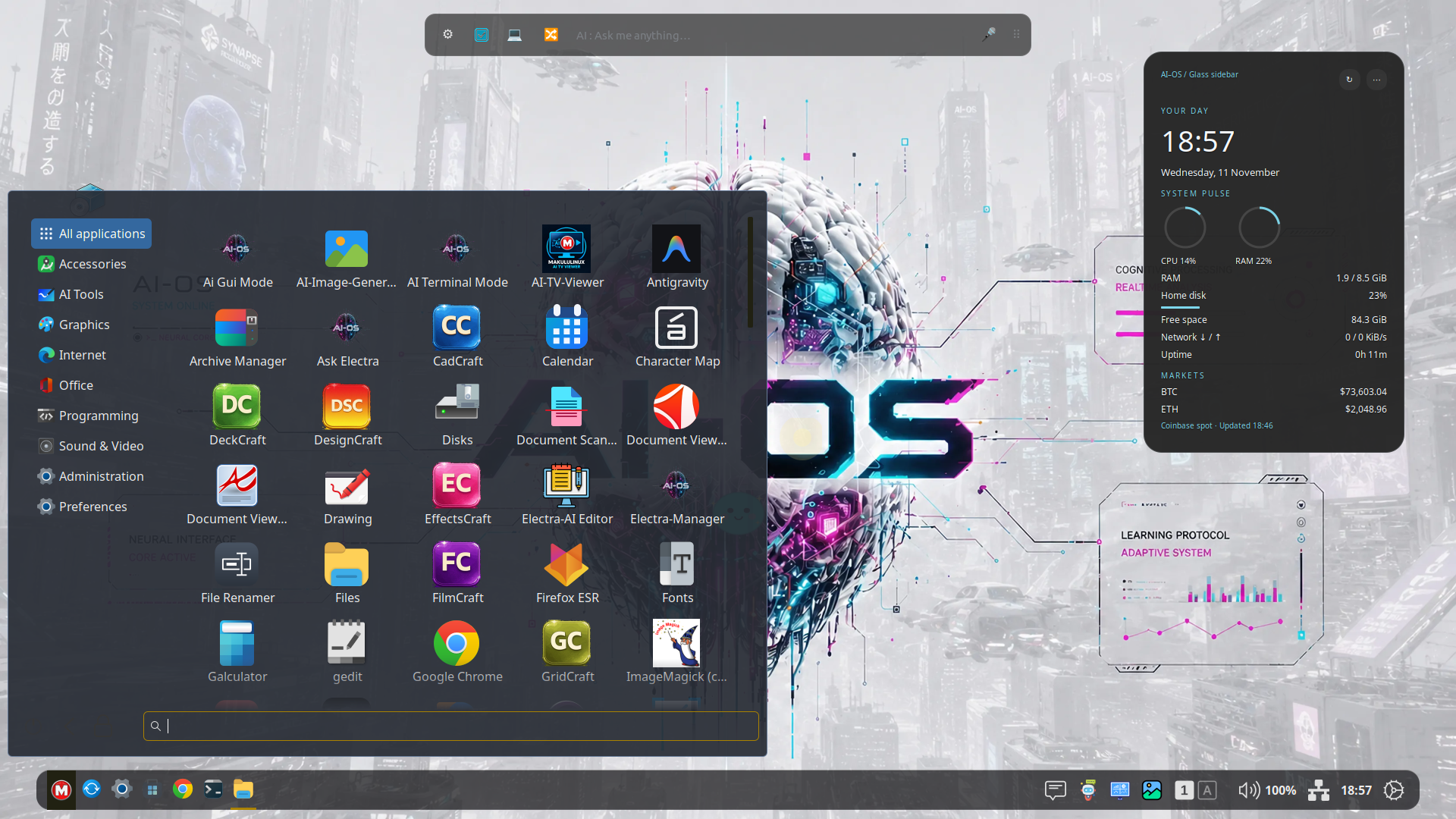
The Desktop Dashboard brings useful information into view without requiring a separate application window.
It sits above the wallpaper and behind ordinary application windows, much like a desktop information layer. The default glass sidebar is positioned on the right, while other arrangements provide different ways to use your screen space.
There are fourteen layouts, including sidebar, square, panorama, ribbon, minimal and corner-based arrangements. Optional Cyberpunk Panel and Cyberpunk Square styles add brighter cyan, orange and magenta accents over dark glass for users who enjoy a more expressive look.
Available information includes system activity, CPU and memory usage, disk space, uptime and network throughput. Optional modules can provide weather, news headlines, Electra connection and quota information, and Bitcoin and Ethereum price snapshots. Thermal information depends on the sensors your machine exposes.
Colors, text, accents, opacity, size and placement can be adjusted. Layouts are designed to fit available screen space without turning the dashboard into a scrolling page.
Online information uses refresh intervals and cached states. It should help you stay informed without pretending that every displayed value is continuously live.
Weather supports a manually selected location and an explicit approximate-location detection option. You can correct the result, and a VPN may cause detection to identify the VPN’s exit location. Weather and other optional modules can be disabled.
Wallpapers without leaving Settings
Personalization extends beyond colors and panels.
The Online tab in Backgrounds lets you search for images, inspect a preview and import a wallpaper from inside the existing settings interface. Photographer credits are shown with the results.
Imported wallpapers save into a wallpaper subfolder in your own Pictures directory, so normal personal imports do not require an administrator password. Saved images remain available for future selection.
This makes trying a new desktop look a small, convenient action rather than a separate download-and-organize task.
Files: a refreshed interface with a way back
The file manager is one of the most frequently used parts of any desktop, so changing it requires care.
AI-OS Files builds on Nemo’s established functionality while offering Classic, Modern, Minimal and Explorer layouts. These alternatives give you different approaches to the sidebar, toolbar, tabs, navigation and visual spacing.
Classic remains available as an immediate fallback. You can explore a newer layout without committing to an unfamiliar interface permanently.
The emphasis is on presentation while retaining essential capabilities: tabs, dual panes, breadcrumbs, keyboard shortcuts, extensions, administrator browsing and ordinary file operations. A details pane can show information about the selected item without requiring a separate properties window.
For users who spend much of their day organizing files, working with several directories or managing projects, this balance between modernization and continuity is especially important.
Where Electra AI fits in
Electra AI Center is the default AI experience associated with AI-OS. It provides access to a broad set of AI capabilities, while AI-OS supplies desktop entry points and integration designed to make those capabilities more convenient to use.
Depending on the selected model, service availability and account access, Electra can assist with tasks such as:
- Drafting, rewriting, explaining and summarizing text.
- Research and information gathering.
- Writing, explaining and troubleshooting code.
- Generating images and other supported creative content.
- Working with supported documents and attachments.
- Carrying out supported agent tasks through desktop tools and skills.
The existing Electra terminal and Canvas interfaces remain part of this experience. The Canvas provides a richer space for conversations, code and supported previews, while panel access makes it easier to reach the established AI interface from the desktop.
The integration is more than a visual launcher, but it is also important to explain its current stage accurately. AI-OS already has desktop bridges and native integration components; the longer-term work of selectively bringing more AI behavior into the desktop is ongoing. Not every AI Center feature has been rewritten as a native AI-OS feature.
That staged approach lets us retain the established Electra capabilities while improving the desktop around them.
Skills turn available tools into usable assistance
A model’s ability to answer a question is different from its ability to use a desktop correctly.
The AI-OS skills approach helps bridge that gap. Skills describe supported desktop capabilities and workflows, giving the assistant guidance about what tools are available and how to use them.
This provides a more structured foundation for assistance with the desktop and supported applications. Rather than treating every operation as an improvised sequence of mouse clicks, integration can expose defined actions that the AI understands.
Coverage will grow over time. A supported skill is not a promise that every application or every possible task can already be automated, but it gives us a practical way to expand those capabilities.
For the user, the goal is less friction between asking for help and getting something useful done.
Your desktop remains useful without cloud AI
AI-OS is still a Linux desktop when you are not using AI.
Browsing local files, managing windows, changing appearance and using installed applications remain ordinary desktop activities. Hosted AI requests and online dashboard information naturally require connectivity.
Electra also has local-model options through Ollama, subject to the available models, configuration and the capabilities of your hardware. Running local models has different memory and performance requirements from using hosted models, and not every cloud capability has a direct offline equivalent.
Hosted AI access may depend on an account, tier and request allowance. Those service details are separate from the basic purpose of the desktop environment. AI is an additional capability, not a requirement to have a useful workspace.
As with any cloud-connected assistant, users should consider what they choose to submit. Files or text sent to a hosted AI service leave the local machine. Local processing and hosted processing are different choices, and should be understood as such.
Useful tools beyond the AI
A successful AI desktop also needs to handle ordinary system tasks well.
AI-OS includes a Task Manager for viewing and managing running processes, available through the desktop’s application and settings entry points.
The Update Manager brings together AI-OS package updates, supported Electra binary updates and updates from the machine’s configured APT repositories. That means a Debian installation uses its configured Debian sources, while Ubuntu uses its own configured sources, including additional repositories enabled by the administrator.
Pending updates can remain visible through a panel indicator even after the main updater window is closed. Mirror configuration can open the installed mirror-management tool where available.
The AI Backup/Restore Tool helps preserve selected Electra settings and data in a compressed archive, with a guided restore process. These backups can include account-related information, so they should be stored securely; the archive is not automatically encrypted.
Release Notes provide a version-by-version record of desktop changes. Latest AI News provides a separate way to read published project articles through an unread panel indicator and article reader, without forcing an article window to appear while you are working. Desktop news requires the associated publishing service to be available.
These tools help make AI-OS a more complete environment, rather than a collection of visual changes.
Motion, depth and optional desktop effects
For users who enjoy a more animated desktop, AI-OS includes controls for effects such as Wobbly Windows, Desktop Cube, Burn and Magic Lamp.
These effects are optional. Their purpose is to add character and feedback, not to get in the way of working.
Window shadows, rounding and motion can contribute to a sense of depth, while workspace previews and navigation help make multiple workspaces easier to understand.
Graphics effects are also sensitive to the environment in which they run. Virtual-machine graphics, GPU drivers, multiple monitors and display configuration can affect their behavior. Some effects have narrower support than ordinary window management, and they should be treated as features to test on your hardware rather than universal guarantees.
Users who prefer a quieter desktop can keep the appearance restrained and reduce animations.
What does AI-OS run on?
The current installation targets are 64-bit x86 PCs using Debian 13, Ubuntu 24.04 or Ubuntu 26.04 foundations. MakuluLinux editions provide the intended integrated distribution experience.
Compatibility work has included package dependency resolution, installation and desktop startup checks across those targets. This does not mean every Debian or Ubuntu derivative, every release, or every hardware combination is automatically supported.
The base distribution, kernel, firmware and graphics drivers still matter. The same is true for networking, audio, suspend and multiple displays. A successful package installation is an important step, but it is not the same as proving every device on every machine.
VMware has been used during desktop testing, alongside isolated installation and regression checks. Virtual machines are useful for trying the interface, but they do not replace physical-hardware testing, especially for graphics drivers and demanding effects.
A conventional Linux-capable x86-64 computer is the intended starting point. Local AI models can require substantially more RAM, storage and GPU capability than the desktop itself. Hosted AI reduces the need to run inference locally, but requires an internet connection.
X11 remains an important validated path. Broader Wayland and cross-toolkit integration are part of the development direction, with further validation needed before claiming feature parity across all sessions and applications.
Why try AI-OS instead of another Linux desktop?
There are many excellent Linux desktops, and each has its own strengths. AI-OS is for users who want a particular combination: a familiar workflow, a more customizable modern appearance, informative desktop surfaces and AI assistance close to everyday work.
Its difference is the way those priorities are being developed together.
Appearance Studio, floating panels, Quick Settings, the dashboard, Files layouts, account tools and Electra entry points are parts of one desktop direction. The aim is to reduce the amount of separate configuration and disconnected tooling needed to create a personal, capable workspace.
For a writer, that might mean drafting with Electra while keeping reference files and system information within reach. For a developer, it might mean combining normal Linux tools with coding assistance and a more flexible workspace. For an everyday user, it might simply mean a desktop that feels familiar, looks how they want and offers help when needed.
You do not need to use every feature to benefit from that approach. You can keep a traditional panel and use AI occasionally, or build a more expressive workspace around glass materials, a dashboard and multiple workspaces.
What should early users expect?
AI-OS is in active development, and the current releases are Alpha test releases.
Expect an environment with substantial working features, frequent improvements and areas that still need refinement. Interfaces may evolve. Experimental effects may need adjustment. Hardware-specific issues can appear, and some larger architectural goals remain on the roadmap.
The best feedback is specific: describe what you expected, what happened, your distribution base, hardware or virtual-machine setup, and the steps needed to reproduce the problem.
Early testing is especially valuable around installation, login, networking, audio, graphics, updates, file operations and the consistency of appearance across applications. Testing everyday work matters just as much as testing the more eye-catching features.
If you want to explore a desktop while helping shape its direction, this is an opportunity to contribute useful experience. If you require an unchanging production environment, take the Alpha status into account when deciding where to try it.
The direction ahead
The longer-term vision is a desktop in which AI can participate more naturally in supported workflows: easier access to assistance, better context handling, more application-aware skills and interfaces that suit the task rather than always requiring the same chat window.
Other areas of development include further frontend modernization, broader platform testing, improved Wayland and application integration, and more flexible extension points.
These are development goals, not a claim that every future capability is already present.
The foundation is being built through practical steps: preserve what works, improve what feels dated, connect useful tools, and make the whole experience more coherent with each release.
MakuluLinux AI-OS Desktop is an invitation to experience a different direction for Linux: familiar enough to start using, flexible enough to make your own, and designed with AI as part of its future.
Explore and stay connected
- MakuluLinux website: https://makululinux.com
- Community portal: https://makululinux.us/members/
- Discord: https://discord.gg/HMd3x5evpe
- Telegram: https://t.me/makululinux
- YouTube: https://www.youtube.com/@makulu.online
Try it, explore it, and tell us where it helps—and where it can be better.