What Is the Finance Bot?
The Finance Bot is not a standalone app — it is deeply integrated into Electra AI Center, the all-in-one AI terminal for MakuluLinux. To use the Finance Bot, you need Electra AI Center. It's free to download and runs natively on MakuluLinux.
Think of the Finance Bot as your tireless autonomous income engine that never sleeps, never gets bored, and constantly operates 37 diversified revenue streams in the background — completely legally, using your own computer.
The goal is simple: Generate money over time without requiring you to be hands-on. Small amounts from multiple streams accumulate 24/7 into meaningful cash even when you are away from the PC.
/hustle approve <id>. You stay in 100% control at all times.
🚀 1-Click Starter Presets
Setting up income streams used to require answering 35 questions. With the 2026 update, setup takes under 15 seconds with 4 curated presets:
Enables background sharing nodes, static affiliate directories, local digital packagers, and referral engines. Generates cash from day one without creating any third-party accounts.
# Activate zero-credential hands-off passive pack
/hustle preset zero_passive

# Test live API credentials for configured services
/hustle test-keys
🔄 24/7 Background Systemd Daemon
The Finance Bot includes a native Linux user systemd service and timer. Once installed, it runs every 4 hours automatically in the background — executing active streams, updating static sites, monitoring nodes, and polling income — even when the terminal window is completely closed.
# 1. Install & enable 24/7 background timer (runs on boot)
/hustle daemon install

# 2. Check live background service status
/hustle daemon status

# 3. View recent background journal logs
/hustle daemon logs

# 4. Stop or restart daemon
/hustle daemon stop
/hustle daemon start
python3 finance_bot.py --run-all every 4 hours. It runs active streams, manages cooldowns, and writes log events to ~/.electra/finance.db. If you configure Telegram, you receive instant push notifications on your phone whenever actions require review.
🖥️ Finance GUI — Visual Management Center
The Finance Bot has a full graphical interface built into Electra AI Center. Type /finance in any terminal window to open it:
/finance
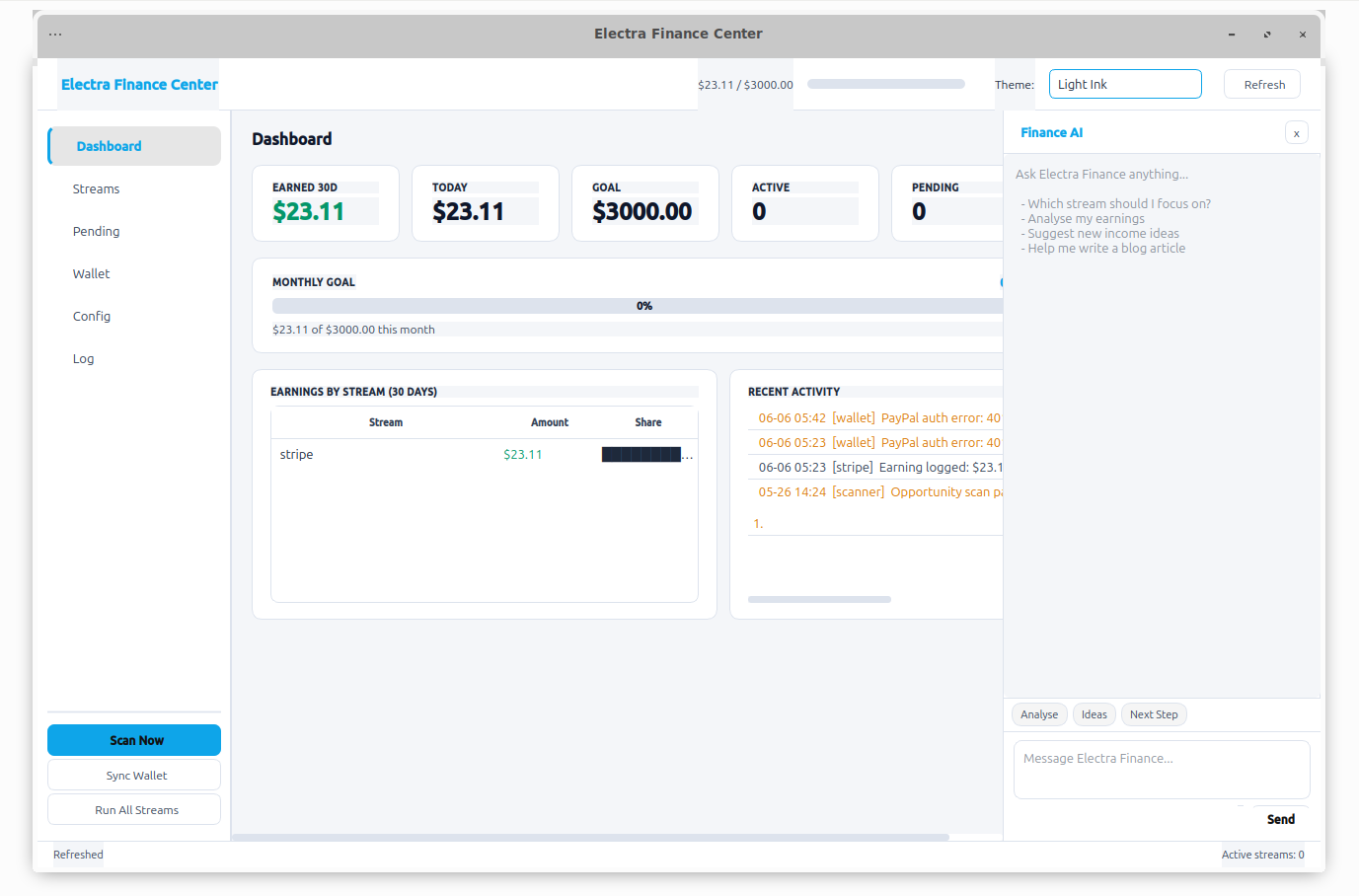
GUI Features
The Big Idea — 37 Diversified Income Streams
Rather than relying on a single volatile revenue source, the Finance Bot operates 37 distinct income streams categorized across 5 pillars:
1. 🚀 Autonomous & Zero-Touch Passive (Streams 34–37)
2. ⚡ Content & Developer Syndication (Streams 21–28)
published: true.3. 📚 Royalties, Community & Launch (Streams 29–33)
4. 🎯 Core & Opportunity Scanners (Streams 1–20)
Includes the original proven engines: Affiliate Content Blog (1), Print-on-Demand (2), Freelance Job Scanner (3), RapidAPI Market (4), Bounty Hunter (5), Digital Products (6), Beehiiv Newsletter (7), Domain Scout (8), Stock Asset Metadata (9), Opportunity Scanner (10), YouTube Scripts (11), Fiverr Gigs (12), Medium Publisher (13), Etsy Digital Shop (14), Prompt Packs (15), Web3 Bounties (16), Notion Templates (17), Social Engine (18), Teespring (19), and Ko-fi (20).
💳 How Payments & Payouts Work (Plain English)
A common question new users ask is: "How does money get into my PayPal or bank account? Who gives my details to whom?"
Here is the short, clear answer: You enter your PayPal or Bank details directly on each platform website (e.g. Lemon Squeezy, Honeygain, or Amazon) when you sign up — NOT into the Finance Bot.
The Finance Bot never touches or processes customer credit cards. It is simply the automated assistant on your computer that creates products, writes articles, designs merch, and uploads them to those platforms.
Visual Step-by-Step Flow
-
1One-Time Account Setup (On the Web)You create an account on a platform (e.g. LemonSqueezy.com or Printful). In your account settings on their website, you enter your PayPal email or bank account:
"Send my earnings to: yourname@gmail.com". That platform now knows where to send your payouts. -
2Connect API Key to Finance BotYou paste your platform API key into
/hustle setup. This gives the bot permission to publish product listings or articles to your account. -
3Bot Works 24/7 in the BackgroundThe bot autonomously creates a digital product (e.g. Python Cheat Sheet), an eBook, or a t-shirt design, and lists it on your store at your chosen price (e.g. $10).
-
4Customer Buys on the PlatformA customer finds your product and pays the platform directly with their credit card. The platform securely processes the payment.
-
5Platform Pays Out to Your PayPal / BankOn the platform's scheduled payout day, they transfer your earnings directly to the PayPal email or bank account you entered in Step 1.
Platform-by-Platform Payout Summary
| Stream Type | Platform | Where You Enter Payout Details | How You Get Paid |
|---|---|---|---|
| Digital Products | Lemon Squeezy / Etsy | Lemon Squeezy / Etsy dashboard settings | Direct transfer to your PayPal or Bank account on payout schedule |
| Print-on-Demand | Printful / Printify | Printful / Printify store billing settings | Customer payment deposits markup profit directly to your PayPal/Stripe |
| Passive Nodes | Honeygain / EarnApp / Pawns | Node web dashboard when requesting cashout | 1-Click payout button sends cash directly to your PayPal email |
| Books & Royalties | Amazon KDP & Associates | Amazon account tax & bank settings | Monthly direct deposit or wire directly to your bank account |
| Tips & Subscriptions | Buy Me a Coffee / Ko-fi / Patreon | Creator payout settings on their site | Tips and monthly membership dues transfer directly to Stripe / PayPal |
| Freelance & Bounties | Upwork / Gitcoin / Algora | Freelancer payment settings on their platform | Client payments deposited into your balance, withdrawable to PayPal or Bank |
Why Does the Finance Bot Ask for PayPal & Stripe in Setup?
If the platforms handle payouts directly, why does the Finance Bot have fields for PayPal and Stripe?
paypal_email(Tip Jar & Readme Links): When the bot generates free open-source tools, static deal sites, or code repositories, it automatically adds a tip badge: "Support the developer: paypal.me/yourname" so users can donate to you directly.paypal_client_id&stripe_key(Read-Only Accounting): This is 100% optional. If you configure read-only reporting credentials, typing/hustlequeries how much total revenue has arrived in your accounts this month and updates the progress bar on your terminal dashboard — saving you from having to log in to multiple websites just to check your earnings.
Inside your PayPal account settings at
paypal.com, you can enable "Automatic Transfers". Set it to Daily or Weekly to your linked bank account. Once enabled, as platforms deposit money into your PayPal, PayPal automatically sweeps the money straight into your checking account!
Setup Wizard Walkthrough
Run the setup wizard at any time via /hustle setup:
/hustle setup
The Dashboard
Type /hustle at any time to view real-time income statistics, goal progress, active streams, and queued approval actions:
/hustle
All Commands Reference
| Command | Description | Example |
|---|---|---|
| /hustle | Show income dashboard, 30-day earnings, and pending items | /hustle |
| /hustle setup | Interactive modern setup wizard with 1-click presets | /hustle setup |
| /hustle preset [name] | Switch preset (zero_passive / developer / creator / full) | /hustle preset zero_passive |
| /hustle test-keys | Test live validity of all configured API credentials | /hustle test-keys |
| /hustle daemon install | Install & enable 24/7 background systemd user timer | /hustle daemon install |
| /hustle daemon status | Check status of background 24/7 service | /hustle daemon status |
| /hustle daemon logs | View background execution logs | /hustle daemon logs |
| /hustle streams | List all 37 income streams organized by category | /hustle streams |
| /hustle add <stream> | Enable an individual income stream | /hustle add nodes |
| /hustle pause <stream> | Pause an individual stream | /hustle pause freelance |
| /hustle run <stream> | Run one specific stream immediately | /hustle run static_site |
| /hustle run-all | Run all active streams right now | /hustle run-all |
| /hustle pending | List all pending approval items | /hustle pending |
| /hustle approve <id> | Approve a queued action | /hustle approve a1b2c3d4 |
| /hustle reject <id> | Reject and dismiss a queued action | /hustle reject a1b2c3d4 |
| /hustle sync | Poll real revenue from Stripe, PayPal, and CJ | /hustle sync |
| /hustle wallet | View configured payment accounts & balances | /hustle wallet |
| /hustle report | Full earnings report (7d, 30d, 90d + products) | /hustle report |
| /finance | Launch the visual PyQt GUI Center | /finance |
The Approval Safety Architecture
The Finance Bot adheres to strict zero-touch safety: The bot will NEVER spend your funds without your explicit authorization.
-
1Autonomous DiscoveryWhen the bot identifies a domain to buy, a job proposal to submit, or a product package to publish, it creates a unique pending item (e.g.
f3a9b2c1). -
2Instant NotificationIf Telegram is connected, you receive a message on your phone with action details and the 1-click approval command.
-
3One-Click ResolutionRun
/hustle approve <id>or click Approve in the GUI. The action is executed and logged.